How to write Test Cases: A step-by-step guide

Writing Test Cases is an essential part of the software development process.

A Test Case refers to a series of actions conducted to validate a particular feature or functionality during the process of software testing. It entails a comprehensive description of the necessary steps, data, prerequisites, and postconditions required to verify the feature. Test Cases serve as a guide to determine whether the feature is functioning correctly or not.

Here’s a step-by-step guide to help you write effective Test Cases:

1. Identify the Requirements

Understand the software’s functional and non-functional requirements. This will help you align your Test Cases with the desired functionality.
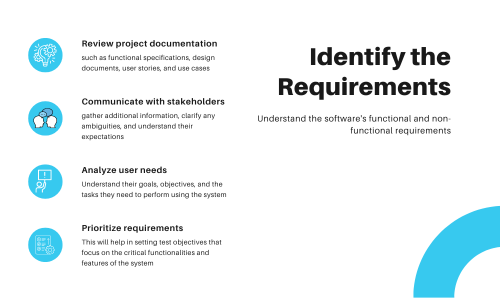
  • Review the project documentation: Start by thoroughly reviewing the project documentation, such as functional specifications, design documents, user stories, and use cases. This will give you a clear understanding of the system and its expected behavior.
  • Communicate with stakeholders: Engage in discussions with project stakeholders, including developers, product owners, business analysts, and end users. This will help you gather additional information, clarify any ambiguities, and understand their expectations.
  • Analyze user needs: Identify the needs and expectations of the end users. Understand their goals, objectives, and the tasks they need to perform using the system. This will help you determine the critical functionalities that need to be tested.
  • Prioritize requirements: Prioritize the project requirements based on their importance and significance. This will help in setting test objectives that focus on the critical functionalities and features of the system.

2.Define Test Objectives

Test objectives are specific goals or targets that define what needs to be achieved during the testing process. They provide direction and focus to the testing efforts and help in evaluating the success of the testing activity.

To define test objectives, follow these points:

  • Understand the project: Gain a clear understanding of the project requirements, scope, and objectives. This will help in aligning the test objectives with the overall project goals.
  • Identify stakeholders: Identify the key stakeholders involved in the project, such as clients, end-users, developers, and project managers. Consider their perspectives and expectations while defining the test objectives.
  • Analyze risks: Identify the potential risks and uncertainties associated with the project. This will help in determining the critical areas that need to be tested and setting appropriate test objectives to mitigate those risks.
  • Define measurable goals: Ensure that the test objectives are specific, measurable, achievable, relevant, and time-bound (SMART). This will make it easier to assess the progress and success of the testing activity.
  • Document the objectives: Document the test objectives clearly, along with the rationale behind each objective. This will serve as a reference for the testing team and provide clarity on the purpose and scope of the testing activity.

3.Define Test Inputs (Data)

Defining test inputs is an important step in the testing process, as it helps determine what data or values need to be provided to the system or software being tested.

Here are the points you need to follow to define test inputs/data:

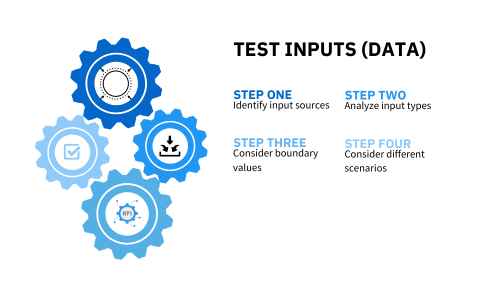
  • Identify input sources: Determine where the inputs for the system or software come from. This could include user input, external data sources, databases, APIs, or any other input mechanism.
  • Analyze input types: Identify the different types of inputs that the system or software accepts. This could include text, numbers, dates, files, or any other specific data types.
  • Consider boundary values: Determine the boundaries or limits for each input type. Test inputs should include values that are at the minimum, maximum, and beyond the expected range to ensure the system handles them correctly.
  • Consider different scenarios: Take into account different scenarios or conditions that might affect the inputs. This could include different user roles, system configurations, or environmental factors.

4.Create Test Cases

Creating Test Cases involves identifying specific situations or conditions that need to be tested to ensure the software or system functions correctly.

A Test Case should have a unique Test Case ID and Headline.  Try and ensure your Test Case headline is as descriptive as possible. A recommended approach is to use a concise name (such as a phrase) for better readability. For instance, an example could be “Invalid Credential Login.”

A sample Test Case format should consist of the following:

Here some key points follow:

  • Define positive and negative: Create Test Cases for both positive (valid inputs, expected outputs) and negative (invalid inputs, error handling) cases. Consider boundary conditions, edge cases, and exceptional scenarios.
  • Prioritize: Prioritize the Test Cases based on their importance, risk level, and frequency of use.
  • Consider different user roles: If the software has multiple user roles, create Test Cases specific to each role to ensure the system behaves as expected for all user types.
  • Include integration and system-level scenarios: Create Test Cases to verify the interactions between different components, modules, or systems to ensure proper integration and system-level functionality.
  • Align Test Cases to Stories: Test Cases should align with each requirement/story.

5.Include Preconditions and prerequisites

These are the set of conditions or requirements that must be met before a Test Case can be executed. They ensure that the software system is in a specific state or configuration that is necessary for the Test Case to run successfully. Preconditions help establish a consistent starting point for the test and ensure reliable and accurate results.

Examples of preconditions include:

  • System setup: The software should be installed and configured correctly.
  • Data setup: The necessary test data should be available in the system.
  • Environment setup: The test environment should be properly set up (e.g., network connections, hardware devices).
  • User authentication: The user should be logged in with the appropriate access rights.
  • Prerequisite tests: Certain tests need to be executed successfully before running the current test.
  • System state: The system should be in a specific state, such as a specific screen or module.
  • Dependencies: Any external dependencies required for the test should be met.

6.Write Test Steps and Expected Results

Outline the steps needed to execute each Test Case. Be thorough and include all necessary instructions. These should be easily repeatable steps performed from the end user’s perspective.

This could be managed in a test management tool, a spreadsheet, or a document.

Follow these points:

  • Define Test Steps: Each test step should have a clear objective and be focused on testing a specific functionality or behavior.
  • Describe the action: Write a clear and concise step that describes the action to be performed. Use action verbs such as “click,” “enter,” “select,” or “verify” to make it explicit.
  • Test Data: Include specific values or data that are used as input for the step
  • Define Expected Results: The expected result after executing the Test Case Step should be stated (every step should have an excepted result). This would be used to verify the Actual Result.

7.Have a Requirements Traceability

Requirements traceability in testing involves establishing and maintaining a clear link between requirements (stories) and the tests that verify them.

Follow the process below to best achieve effective requirements traceability in testing:

  • Identify and document the requirements: Begin by understanding the project’s requirements and documenting them in a clear and concise manner. Use a Test Management tool or a spreadsheet to record each requirement.
  • Create a traceability matrix: Develop a traceability matrix. The matrix helps visualize the relationship between requirements and tests, making it easier to track progress and identify any coverage gaps.
  • Link requirements and Test Cases: Establish links between the requirements and Test Cases in your traceability matrix. This can be done manually or by utilizing a test management tool that supports traceability features.
  • Analyze coverage: Regularly review the traceability matrix using a test management tool to ensure that all requirements have associated Test Cases and that the tests cover all aspects of the requirements. Identify any gaps or missing Test Cases and update the matrix accordingly.
  • Maintain traceability: As the project progresses, update the traceability matrix to reflect any changes in requirements, Test Cases, or test results. This ensures that the traceability remains up to date throughout the testing process.

8.Organize and maintain

Organize your Test Cases in a clear and structured manner.

Use Test Case Management Tools to store and track the execution status of each test case.

Here are some tips to help you with this:

  • Test Case Management Tool: Use a Test Case Management Tool to store and organize your Test Cases. This tool should allow you to create test cases, assign them to specific test cycles, and track their execution status.
  • Categorize Test Cases: Categorize your Test Cases based on different criteria such as functionality, components, module, priority, or severity. This makes it easier to locate and execute Test Cases based on specific requirements.
  • Use Descriptive Names: Give meaningful and descriptive names to your Test Cases. This helps testers and other stakeholders understand the purpose and scope of each test case without having to read the entire description.
  • Regular Review and Update: Review and update your Test Cases regularly to keep them up to date with changes in the application or system under test. This includes verifying that the test steps and expected results are still valid.
  • Collaboration and Communication: Foster collaboration and communication among the testing team and other stakeholders. Encourage feedback and suggestions for improving Test Cases, and ensure that everyone has access to the latest test case documentation.

By following these best practices, you can create comprehensive and reliable Test Cases that effectively validate the functionality of your software.